Company
This section explains how to create a company template for use across multiple projects. The schema depends on your company and its rules, so there is no single approach that fits every case. Rules retrieve data from specific locations in the schema. If you are unfamiliar with how your rules are configured, contact DAQS for help creating the schema.
You need Company administrator privileges on the DAQS Dashboard. If you don’t see the Company menu, then you do not have these permissions.
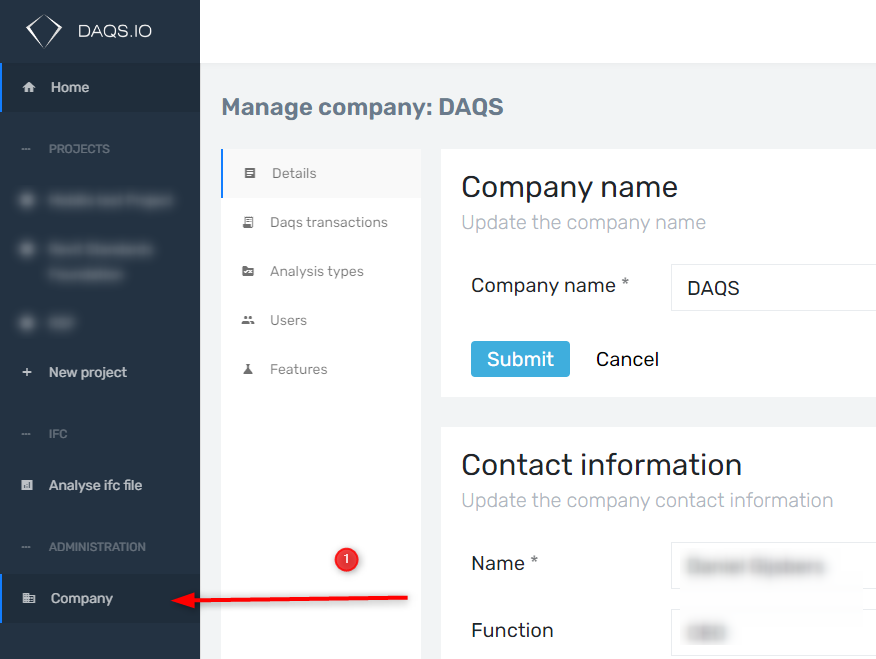
1. Add a JSON Schema at company level
!!! Let DAQS create the schema for you. It’s a small job, and we’re happy to help.
A JSON Schema is a template that defines the permitted structure and values of your project data. It tells DAQS:
- which fields must exist
- what type the values must be (string, number, boolean, array, object)
- which fields are optional
- what the allowed values are
- what the structure must be
Think of it as the technical contract for your project data.
Why DAQS Needs It
Project-specific rules require project-specific inputs. Without a schema, every project would hand over data in a different structure — and suddenly you’re debugging bad project data instead of validating models.
The JSON Schema ensures:
- data is predictable
- rule authors know what to expect
- DAQS can validate input before the rule runs
- project teams see clear, consistent error messages
High-Level Explanation of JSON Schema Parts
1. $schema
- Indicates which JSON Schema version is used.
- Useful for editors and validators; DAQS itself doesn’t rely on it.
2. type: "object"
- Says the top-level JSON must be an object containing key–value pairs.
3. properties
Defines the allowed keys at the top level. Each property describes:
- the expected type (string, number, array, object)
- the expected structure
- the subfields and their own types
- whether those subfields are required
This is where you control the structure of valid project data.
4. required (top-level)
Lists the keys that must exist in the project JSON. If one is missing, DAQS immediately shows an error before any rule runs.
Example
Under properties, you see a section named BasePoints.
This defines the required structure of the base point data.
Because there can be multiple base points, the type is an array.
Inside items, you specify what every array item must contain.
Each key has a defined type:
"x_meters": { "type": "number" }→ the value must be a number"category": { "type": "string" }→ the value must be text
This means: when entering project data, you must follow these types.
Example of correct vs incorrect values
| ✔ good value | ✖ bad value |
|---|---|
| 123 | "123" |
| 0 | null |
| 123.45 | 123,45 |
| 3 | 3m |
| 3 | 3000 mm (when you mean 3 m) |
Schema snippet
{
    "$schema": "http://json-schema.org/draft-04/schema#",
    "type": "object",
    "properties": {
        "Bedrijfsafkorting": {
            "type": "string"
        },
        "Levels": {
            "type": "array",
            "required": [
                "name",
                "elevation",
                "buildingStory",
                "structural",
                "ifcName"
            ],
            "additionalProperties": false,
            "properties": {
                "name": {
                    "type": "string",
                    "minLength": 1,
                    "description": "Levelnaam zoals gedefinieerd in Revit"
                },
                "elevation": {
                    "type": "number",
                    "description": "Hoogte van het level t.o.v. projectnulpunt"
                },
                "buildingStory": {
                    "type": "boolean",
                    "description": "Revit parameter: Building Story (SpecTypeId.Boolean.YesNo)"
                },
                "structural": {
                    "type": "boolean",
                    "description": "Revit parameter: Structural (SpecTypeId.Boolean.YesNo)"
                },
                "ifcName": {
                    "type": "string",
                    "description": "Naam van de gekoppelde IFC BuildingStorey"
                }
            }
        },
        "BasePoints": {
            "type": "array",
            "items": [
                {
                    "type": "object",
                    "properties": {
                        "category": {
                            "type": "string"
                        },
                        "name": {
                            "type": "string"
                        },
                        "x_meters": {
                            "type": "number"
                        },
                        "y_meters": {
                            "type": "number"
                        },
                        "z_meters": {
                            "type": "number"
                        },
                        "angle_rad": {
                            "type": "number"
                        }
                    },
                    "required": [
                        "category",
                        "x_meters",
                        "y_meters",
                        "z_meters"
                    ]
                }
            ]
        }
    },
    "required": [
        "Levels"
    ]
}
Important
Rules retrieve data from specific locations in the schema. If you are unfamiliar with how your rules are configured, contact DAQS for help creating the schema.